
After updating AI support knowledge, confirm that the new content is available to the intended Agent, preview a fixed set of questions, and retest through the channel customers actually use. A successful save, a correct preview and a reply received by a visitor are three separate checkpoints. One does not establish the other two.
A cross-border team changes its shipping guidance and tells the next shift, “The information is updated.” But the next colleague may not know which paragraph changed or which Agent serves the website. When a shopper asks a follow-up question, the investigation starts again. This guide offers a smaller acceptance process: validate one clearly defined rule and keep the question, evidence and channel result together.
YundaDesk AI customer service handles customer inquiries; Yuna helps the team investigate and operate the workspace. Use Yuna to assist with checks and test preparation, not as a substitute for evidence. The worksheet and examples below are editorial recommendations, not customer results, built-in reports or performance promises.
Before testing: define the change you can actually verify
Prepare the original question, the approved business source, its conditions and the person responsible for confirming it. Start with one meaningful rule rather than retesting dozens of files at once. For example, identify the destinations covered by a particular shipping method. Record what changed, including any dates, time zones, product restrictions or exceptions. An unapproved business statement should not become a customer promise merely because someone calls it a test.
Identify the workspace, target Agent, channel and test language. A team can have different sales and support Agents or several website entry points. Two answers that appear inconsistent may have come from different configurations. Use names and identifiers you can verify on the relevant page, rather than remembering the appearance of a chat window.
Use a test visitor controlled by your team. Do not demonstrate the process in a real customer’s conversation or copy contact details, orders or full customer histories into a public worksheet. Where a scenario genuinely requires order data, an authorized colleague should validate it in the permitted environment. Static-knowledge acceptance does not replace verification of order lookups, refunds or other business actions.
Step 1: check availability and the Agent’s actual knowledge scope
Inspect the update and its processing status in the knowledge base. Leave an unfinished update pending. If processing failed, inspect the specific failure instead of uploading the same file repeatedly. The official processing-status guide (Chinese) notes that the previous successful version may still be used after a failed update. A filename containing “new” is not proof that its contents are the current answer source.
Once processing succeeds, check the intended Agent’s knowledge scope and the relevant channel binding. Also verify whether the source or question-and-answer entry participates in answers. The question is not simply whether the workspace contains a document, but whether this reception path can use it. The knowledge-base maintenance guide (Chinese) describes this relationship.
For assistance, ask Yuna for a read-only check that names the Agent, source and channel, requests the effective scope and unresolved items, and prohibits changes. The Yuna common-tasks guide covers configuration checks and answer previews. Keep inaccessible items unverified: an inability to read a setting does not mean that it is disabled, and copying someone else’s sensitive data is not a way around permissions.
If you first want instructions rather than a workspace inspection, ask for guidance only. The screenshot illustrates that separate request.
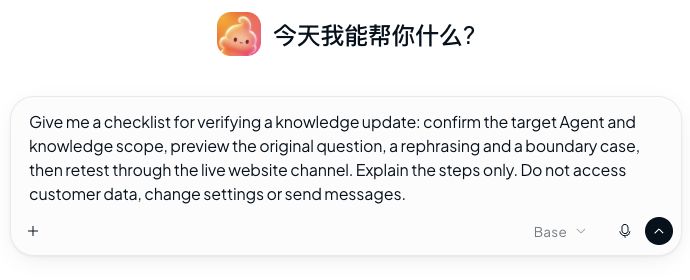
Step 2: define acceptance conditions before running a preview
Replace “the answer sounds good” with observable criteria. Before previewing, state what the answer must include, what it must not promise and what it should ask when information is missing. Otherwise, a fluent response can tempt the reviewer to relax the standard after seeing it. We recommend four starting cases: the original question, a rephrasing, a boundary case and an incomplete request. This is a testing method, not a mandatory product setting.
| Case | Example question | What to inspect |
|---|---|---|
| Original | Which destinations does this shipping method cover? | The scope matches the approved source |
| Rephrased | Can I choose that delivery option where I live? | Different wording preserves the conditions |
| Boundary | Is delivery guaranteed to a destination not listed? | A limited rule does not become a guarantee |
| Incomplete | Can you ship to me? | The missing destination is clarified, not guessed |
These examples specify no real shipping policy. Substitute your approved business rule before testing. Add equivalent questions in the languages your team actually supports. A more natural English sentence must not silently drop a restriction present in Chinese; equally, a good translation does not need to reproduce Chinese word order.
When asking Yuna for a preview, include the target, exact question and a no-customer-message constraint. Alternatively, select a specific Agent in the AI Agents test conversation, submit the same question and inspect its answer details. See the test and answer-details guide (Chinese). Record the Agent actually selected for this run rather than assuming the previous selection still applies.
Review facts and conditions before tone. If the answer is correct but its basis cannot be verified, record “answer meets expectations; source unverified.” Do not mark the entire path as passed. Conversely, retrieving a particular source does not establish that the answer interpreted it correctly. Current evidence and correct application of its conditions both matter.
Step 3: repeat the question through the customer’s entry point
After the preview passes, open the actual website chat as your controlled test visitor and ask the same question. This checks the customer path: whether the message enters the right workspace and channel, which Agent handles it, and whether the visitor receives the answer. A screenshot of an internal test is not evidence of live website delivery.
Record a separate test identifier and send time, then match the visitor’s exchange to the conversation in the workspace. Keep the customer question natural; do not insert a long internal testing instruction into it. Check for duplicate or truncated replies and inconsistent history after refreshing, then compare the business conditions with the preview. The real-channel delivery guide (Chinese) explains the delivery checks.
If a person already owns the test conversation, inspect the reception state before deciding that the AI failed to respond. Any handoff change, channel rebinding or resend should follow the authorized workflow. Do not alter production reception merely to obtain a successful screenshot. Locating the layer at which a test failed is more useful than repeatedly asking until a pleasing answer appears.
Step 4: leave a record the next shift can reproduce
A lightweight record can include the business-rule version, Agent, channel, language, test time and time zone, exact question, expected conditions, actual answer, evidence location, visitor-side result and responsible owner. These are suggested team fields; do not assume the product automatically generates this worksheet. Store internal evidence behind appropriate access controls and share only necessary redacted excerpts publicly.
Separate the conclusions: “knowledge scope checked,” “four preview cases passed” and “website visitor received the answer” each require their own evidence. Keep incomplete checks visible instead of reporting an overall pass. For a failure, name who will investigate, which object they will inspect and what result will close the issue. “Ask engineering” is not a reproducible next step.
For example: “The website test still states the old destination scope; the preview follows the new rule. The owner will check the Agent and source attached to that entry point. After an approved correction, rerun the original and boundary questions.” This is a hypothetical troubleshooting example, not a claim about a real incident in this product or a customer’s workspace.
Troubleshooting without unnecessary rework
Why test an answer after processing has completed?
Processing establishes content readiness; a question tests its use in a particular answer. These are different checks. Verify the object and scope, then inspect the answer’s basis. One disappointing answer is not a reason to upload every document again.
What if the preview and website disagree?
Keep both outputs and timestamps. Compare the Agent, channel, knowledge version and conversation context. Explain differences in test conditions before comparing results, and do not blame caching, the model or the visitor’s browser without evidence.
Is one successful question enough?
It establishes only that one case passed at that time. For a rule affecting customer commitments, add rephrased, boundary and incomplete requests. Match the testing effort to business risk. Neither a convincing answer nor the four examples in this guide establishes complete coverage.
How should a question with no supported answer behave?
Include non-fabrication and appropriate clarification or human handling in the expected behavior. Check that the response does not exceed its evidence. Validate any real-time business capability separately rather than expecting a static policy to report current order status.
Start the next update with one bounded acceptance cycle
Choose one updated rule, fix the target and version, prepare the questions, preview them, repeat them through the real channel and retain a traceable result. The aim is not more paperwork. It is to make “updated” mean something that a colleague and a test visitor can both verify.
For source preparation, see our knowledge-base preparation guide (Chinese). For the team-assistant entry point, read the Yuna introduction. This article focuses on acceptance after an update rather than repeating first-time setup.
By the YundaDesk team. First-party product guidance and editorial testing recommendations. Sources checked October 22, 2026. Examples contain no real customer records and do not establish that any customer’s configuration was changed or a message was sent.